Showing posts with label Tech. Show all posts

Friday, 9 September 2016

Adeboye

Passengers Warned Not To Use Samsung Galaxy Note 7 On Planes


Air travellers are being warned not to use their Samsung Galaxy Note 7 smartphones on planes after the company recalled the devices over complaints the batteries can catch fire.
“In light of recent incidents and concerns raised by Samsung about its Galaxy Note 7 devices, the Federal Aviation Administration strongly advises passengers not to turn on or charge these devices on board aircraft and not to stow them in any checked baggage,” the FAA said late Thursday in the U.S.
According to BBC,l ast week, Samsung ordered a global recall of the jumbo phones after its investigation of explosion reports found the rechargeable lithium batteries were at fault. In one case, a family in St. Petersburg, Florida, reported a Galaxy Note 7 phone left charging in their Jeep caught fire, destroying the vehicle.

Samsung said a week ago that it was halting sales of the Note 7 and would recall 2.5 million devices in 10 countries, including South Korea and the U.S. The company will replace them with new Note 7 phones.
Samsung was responding to dozens of complaints from customers that their phones had caught fire while charging. It said it had investigated the issue and found a problem with the batteries in a small number of Note 7 devices.
Samsung has said customers who have already bought the phone will be able to swap it for a new one and that it would take about two weeks to prepare replacement devices.
Read More

Thursday, 8 September 2016

Adeboye

New IPhone Ditches Headphone Socket


Apple said its lightning connector could be used instead, which would make room for other components. It will also promote the use of wireless earphones, and has released a set of its own called Airpods.

The firm said it had taken “courage” to take the step.

However, it risks annoying users who will now require an adapter for existing headphones.

The US company unveiled its latest handsets at an event in San Francisco following a year in which its phone sales and market share shrank.

Other new features include:

*the home button can now detect how firmly it is being pressed and provide vibration-based feedback, but no longer moves into the phones

*the handsets can be submerged in water up to depths of 1m (3.2ft) for 30 minutes at a time

*the larger iPhone 7 Plus model gets a two-lens camera on its rear, allowing it to offer a choice of focal lengths

The launch comes a week after the European Commission demanded Apple pay up to €13bn (£11bn) in back taxes to Ireland – a ruling the firm is appealing.

“The current difficulties with the EU will have little bearing towards the iPhone 7 at this juncture,” predicted Ben Wood from the CCS Insight consultancy.

“But the dispute will drag on for years, and if sentiment turns against Apple that could have major implications for the brand.

“For now, there’s a strong argument that the iPhone 7 is more than an iterative update.

“Upgrades are all important to Apple and for consumers coming from an iPhone 5S or iPhone 6, the iPhone 7 will feel like a considerable step up.”

The 3.5mm headphone jack was made popular by Sony’s Walkman cassette players, but was first introduced in one of the Japanese company’s transistor radios in 1964, reports the BBC.

Apple has repeatedly been willing to ditch connectors and other ageing tech from its products earlier than its rivals.

However, it was not first in this case.

“Lenovo’s Moto Z and select models from Chinese manufacturer LeEco have launched without the 3.5mm socket in 2016,” noted IHS’s Ian Fogg.

“These manufactures have had little adverse reaction, in part, because they sell many fewer smartphones than Apple.”

One audio expert also had doubts.

“If you’ve been interested purely in the audio quality then a wired connection has always been best,” said Simon Lucas, editor of What Hi-fi magazine.

“You have greater stability – there’s no possibility of drop-outs. Wireless headphones also need to be charged, and the louder you listen to them the quicker they will run out of power.

“With regards to headphones with a lightning connector, there’s only about eight pairs currently available and they will all have had to pay Apple a licence to use its proprietary connector.”

Apple, however, suggests there are advantages to using its Airpods, which will cost £159.

It demonstrated that the wireless headphones could be paired with the phone much more quickly than is normally the case with Bluetooth sets.

The Airpods also contain infrared sensors to detect when they are in the user’s ears. This allows them to automatically stop music when they are taken out.

Motion sensors in the buds also allow the firm’s virtual assistant Siri to be activated for voice commands by double-tapping their sides.

Users will, however, have to get used to charging another device.

Apple said the Airpods would last “up to five hours” on a charge, and come with a recharging case that can extend their life up to 24 hours before a plug socket is required.

Another related change is the introduction of stereo speakers – one at each end of the handset – which Apple said meant the iPhone 7 could deliver twice the volume of the iPhone 6S.
Read More

Thursday, 1 September 2016

Adeboye

How To Stop Unsolicited Messages From MTN, Airtel, Glo, Others


Following a Direction to the telecommunications service providers in the country, the operators, will from July 1, 2016, activate the DO NOT DISTURB facility which gives subscribers the freedom to choose what messages to receive from the various networks. With this Direction the operators have been mandated to dedicate a common Short Code (2442) which will enable subscribers take informed decisions. Mr. Tony Ojobo, Director of Public Affairs, Nigerian Communications Commission (NCC), in a statement, said this action was taken in order to protect subscribers from the nuisance of unsolicited texts, and therefore a direct regulatory response to the yearnings of the subscribers. 

By this action, he explained, the Commission has invoked a regulatory provision which had hitherto been overlooked by the operators. Taking cognizance of the broad range of services which include: Banking/Insurance/ Financial Products, Real Estate, Education, Health, Consumer Goods and Automobiles, Communication/ Broadcasting/ Entertainment/ IT, Tourism and leisure, Sports, Religion(Christianity, Islam, others), the Commission directed the operators to give the necessary instructions and clarifications that will enable subscribers subscribe to a particular service/services /none at all. 

In fact, a Full DND which is SMS “STOP” to 2442 does not allow the subscriber to receive any unsolicited message from the operators at all. Below are the various options: 

“SMS 1” for receiving SMS relating to Banking? Insurance/ Financial products to 2442 
“SMS 2” for receiving |SMS relating to real Estate to 2442 
“SMS 3” for receiving SMS relating to Education to 2442 
“SMS 4” for receiving SMS relating to Health to 2442 
“SMS 5” for receiving SMS relating to Consumer goods and Automobiles to 2442” 
“SMS 6” for receiving SMS relating to Communication/ Broadcasting Entertainment/IT to 2442 “SMS 7” for receiving SMS relating to Tourism and leisure to 2442 
“SMS 8” for receiving SMS relating to Sports to 2442 
“SMS 9” for receiving SMS relating to Religion to 2442 

Ojobo pointed out however that the decision of the Commission does not affect personal messages or person to person messages which are private communication by individuals. He urged the operators to comply immediately with the Direction issued by the Commission and never again harass subscribers with unwanted messages.
Read More

Friday, 26 August 2016

Adeboye

Facebook Launches New Social Media App To Compete With Snapchat


Facebook has quietly launched a new mobile app aimed at video-loving teens.

In a direct challenge to Snapchat, “Lifestage” is an iOS app that helps school kids connect with each other by sharing video snippets of their day.

The app prompts users to upload videos and photos that show off their likes, dislikes, best friends, favourite dance moves and more.

Users aged more than 21 are only able to view their own profiles, reports the Tech Crunch website.

However the app warns that it cannot guarantee whether all its users are genuine.

“We can’t confirm that people who claim to go to a certain school actually go to that school. All videos you upload to your profile are fully public content,” it says.

Lifestage has no messaging functionality but users can display contact details from other sites such as Snapchat and Instagram.
Read More
Adeboye

WhatsApp Is Now Sharing Your Phone Number With Facebook, Here’s How To Stop It


WhatsApp announced yesterday that it would start sharing some user data — including your phone number — with parent company Facebook.

The two companies say the new policy will help you find friends and “improve your Facebook ads and products experiences,” but it will also give businesses a new avenue to reach potential customers, with WhatsApp describing situations where banks and airlines will use your phone number to get in touch about fraudulent payments or delayed flights.

But you cannot be sure, can you?

Now it has emerged that there is a hidden way of opting out of the terms, and ensuring that no data is sent over to Facebook. But it has to be done quickly.

The first way can only be done if you haven’t accepted the new terms, using the pop-up that will emerge when you open up WhatsApp.

If you haven’t, wait until that happens but don’t click “agree” – instead navigate to the smaller “read more” option, and untick the box that says “Share my WhatsApp account information with Facebook”.

If you’ve already accepted those new terms, you can still opt out – as long as it’s within 30 days.

You can do that by heading to the settings menu in the app, and pressing on the account tab – there you’ll find a “share my account info” button that you can undress and revoke your permission.
Read More

Thursday, 25 August 2016

Adeboye

Top 20 Battery-Killing Apps


Battery-killing apps include those apps that run in the background when your phone is on. If your battery is draining faster than you would want, one of these apps could be responsible:

According to http://www.techlicious.com, the problem apps include the ones that run when you power your phone and apps you launch yourself. They are:

Samsung AllShare (now Samsung Link)

Samsung Security Policy Update

Beaming Service for Samsung
ChatON
Google Maps
Facebook
WhatsApp
WeChat
AppLock
BBM (BlackBerry Messenger)

Samsung AllShare, Samsung Security Policy Update and Beaming Service for Samsung are automatically installed on select Samsung smartphones. Samsung Link lets you access multimedia content on other Samsung devices from your smartphone, Security Policy Update helps keep your phone secure and Beaming Service lets you send barcodes from your phone to barcode scanners.

If you don’t regularly use any of these apps, it is advisable that you uninstall them to give your battery a boost. Note that you can easily access Facebook from a mobile web browser and get updates whenever you want—without Facebook always running in the background.

The list of top 10 battery-draining apps that you have to actively click to run are:
Samsung WatchON
SnapChat
Microsoft Outlook

LINE: Free Calls and Messages
Clean Master
Spotify
Amazon Shopping
Super-Bright LED Torch
BBC iPlayer
PicsArt Photo Studio

Media streaming apps Spotify and iPlayer constantly stream data and consume a lot of power. Once you turn Samsung’s WatchON remote control app on, it remains running in the background.
Read More

Tuesday, 2 August 2016

Adeboye

Grade 12 Student Invents Phone That Calls Without Using SIM & Airtime (Photo)


A Grade 12 student in Namibia’s Ohagwena region has invented a sim-less phone that allows users to make free calls and even watch one TV channel.

Simon Petrus, a student at Abraham Iyambo Senior Secondary School, created the phone using spares from a phone and television set.

Complete with a light bulb, fan and charger socket, the phone functions off power supplied through a radiator and is able to make calls to anywhere through the use of radio frequencies. Waoh!


The invention, which is made up of a radio system, is attached to a box and also allows the user to view one TV channel on it. He is also able to watch NBC1 TV on his box.

No stranger to the world of creation, young Simon is reported to have won a gold medal at national level last year for his invention of a two-in-one machine that works as both a seed drier and cooler.

The shy young man has admitted to working on his invention for two years through money provided by his struggling parents.

He said he invented the phone with the hope it would be successful and be able to be carried further.
Read More

Monday, 1 August 2016

Adeboye

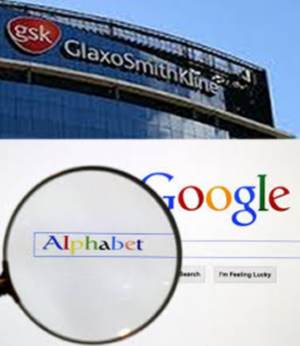
GSK Forms Joint Venture With Google’s Parent Company


British drugs giant GlaxoSmithKline announced Monday that it will form a joint venture with Google’s parent company Alphabet to research and develop so-called bioelectronic medicines.


GSK has agreed with Verily Life Sciences (formerly Google Life Sciences) to create a new company called Galvani Bioelectronics, it said in a statement.

The venture will be headquartered in Britain and will receive a total investment of up to £540m ($714m, €640m) over seven years.

GSK will hold a majority of 55 per cent in the group and Verily will have a 45 per cent stake.

“Bioelectronic medicine is a relatively new scientific field that aims to tackle a wide range of chronic diseases using miniaturised, implantable devices that can modify electrical signals that pass along nerves in the body, including irregular or altered impulses that occur in many illnesses,” the statement added.

“GSK has been active in this field since 2012 and believes certain chronic conditions such as arthritis, diabetes and asthma could potentially be treated using these devices.”

Monday’s announcement comes one week after GSK revealed plans to invest £275m into three of its British manufacturing sites, shrugging off worries over economic fallout arising from Brexit.

That investment will be ploughed into facilities in Barnard Castle in northeastern England, Ware in the southeast, and Montrose in Scotland.

AFP
Read More

Tuesday, 26 July 2016

Adeboye

After Rejecting Microsoft's $45 billion Offer,Yahoo Is Selling To Verizon For $4.8 Billion


Verizon, announced on Monday that it was buying Yahoo’s core internet business for $4.83 billion in cash.

The deal, which was reached over the weekend, unites two titans of the early internet, AOL and Yahoo, under the umbrella of one of the nation’s largest telecommunications companies. Verizon bought AOL for $4.4 billion last year. Verizon plans to keep most of Yahoo’s current products, including its still popular email service, and invest in them to make them stronger.


However, he said that Verizon has not yet decided what it wants to do in search, an area where Yahoo has waged a losing fight against Google for a decade.
In 2008, Microsoft (MSFT, Tech30) was willing to pay more than $45 billion for Yahoo, an offer that was rebuffed by cofounder Jerry Yang.
Read More

Monday, 18 July 2016

Adeboye

Elegant Popular Posts Widget Style


Blogger created a gadget to display the most Popular Posts from our own blog to increase our blogger blog's page impressions or page views and traffics. This allows our readers to find the best articles which is helpful and informative. However, blog readers aren't attracted by the default look of this widget, it doesn't look professional enough to attract any reader. But with the help of CSS we can change and modify the default style of this widget.


There are 4 different ways to display Popular Posts Widget:
1. Display only Posts title;
2. Display Posts title and snippets;
3. Display Posts title and image thumbnails; and
4. Display Posts title, snippets and image thumbnails.

Today I will share our very own Popular Posts Widget Style which displays Posts title and image thumbnails.


Step 1 : Adding the Gadget
 Go to Blogger
 Layout
 Add a Gadget
 Choose Popular Posts Widget
 Uncheck Snippet then Save


Step 2 : Navigating
 Go to Blogger
 Template
 Backup your Template
 Press Edit HTML


Step 3 : Adding the Code
 Search for ]]></b:skin>
 Copy the following code and paste it before ]]></b:skin>

/*--------------- Popular Posts ---------------*/
.PopularPosts .widget-content ul li .item-thumbnail img{
padding: 5px;
border: 1px solid #fff;
-webkit-border-radius: 100px;
-moz-border-radius: 100px;
border-radius: 100px;
-webkit-box-shadow: 0 1px 2px rgba(0, 0, 0, .4);
-moz-box-shadow: 0 1px 2px rgba(0, 0, 0, .4);
box-shadow: 0 1px 2px rgba(0, 0, 0, .4);
width: 100px;
height: 100px;
z-index: 99;
position:relative;
background:#fff;
-moz-box-shadow:  0;
-webkit-box-shadow: 0;
box-shadow: 0;
}
.PopularPosts .widget-content ul li:hover img {
background:#00aa9f;
-moz-box-shadow:  5px 0 3px #007d75;
-webkit-box-shadow: 5px 0 3px #007d75;
box-shadow: 5px 0 3px #007d75;
border: 1px solid #007d75;
}
.PopularPosts .widget-content {
background:#fff;
padding: 0 10px;
}
.PopularPosts .widget-content ul li {
position:relative;
}
.PopularPosts .widget-content ul li .item-title {
position:relative;
left: 5px;
top: 20px;
z-index: 1;
}
.PopularPosts .widget-content ul li .item-title a{
-webkit-transition: all 0.5s;
-moz-transition: all 0.5s;
transition: all 0.5s;
text-decoration: none;
color:#00aa9f;
text-shadow:1px 1px 1px #fff;
}
.PopularPosts .widget-content ul li:hover .item-title a{
color:#fff;
text-shadow:1px 1px 1px #00544f;
}
.PopularPosts .widget-content ul li .item-title:before {
left: 30px;
display: inline-block;
position: absolute;
content: "";
width: 0px;
height: 100%;
-webkit-border-radius: 100px;
-moz-border-radius: 100px;
border-radius: 100px;
-webkit-box-shadow: 0 1px 2px rgba(0, 0, 0, .4);
-moz-box-shadow: 0 1px 2px rgba(0, 0, 0, .4);
box-shadow: 0 1px 2px rgba(0, 0, 0, .4);
position:absolute;
-webkit-transition: all 0.5s;
transition: all 0.5s;
z-index: -1;
background:#00aa9f;
}
.PopularPosts .widget-content ul li:hover .item-title:before{
width: 90%;
}


Step 3 : Finishing
 Save your Template

Customization :
 Change #007d75 to edit the border color and box shadow color of the image when hovered.
 Change #00aa9f to edit the background color when hovering and the post title color.

Subscribe to our NEWSLETTER for our upcoming posts! Let me know if you're facing any problems installing this widget. Enjoy blogging!
Read More

Sunday, 17 July 2016

Adeboye

Glo Introduced New Tariff Plan That Will Blow Your Mind


Hello everyone, our beloved indigenous network, Globacom has here again with their usual fantabulous offer.

Globacom has launched a new tariff plan called “Glo Jollific8”, it is specially designed to give new Globacom prepaid customers eight times more value on every recharge and the offer is not just limited to calling just GLO to GLO lines, but you get to call any other network!

Glo Jollific8 offers new subscribers, 800% more value on every recharge from N100 and above, as customers get octuplet benefits, including bonus to call all local networks, browse freely and get free data that can be gifted to other subscribers.

It is similar to MTN StartPack of 500% bonus, but this is even better than the MTN StartPack, we all understand the difference between 500% and 800%.

BENEFIT OF GLO JOLLIFIC8
» Every recharge gives 8 times the value of what you recharge


» Every recharge comes with free data and free voice
» You can also choose to share free data with someone else via gift

EXPLANATION
»N100 recharge, gives N800 airtime + 10MB
»N200 recharge, gives N1600+N100(25MB to gift)=N1700
»N500 recharge, gives N4000 + N200 (50MB to gift) =N4200
»N1000 recharge, gives N8k +N400 (100MB to gift)=N8400
»N5000 recharge, gives N40k + N2k (500MB to gift)=N42k

To Join Glo Jollific8 Tariff Plan
» Get a new Glo sim card
» Register and get it activated (you’ll automatically be on Jollific8 tariff plan)
»Dial *123*Pin# and you are good to go.
»To check your data balance, dial #122# and for data gifting, dial *606#

If you wish to enjoy long time talk with your loved ones, consider getting yourself a new Glo sim, register and activate it and you are automatically on theGlo Jollific8 tariff plan.

It seems Globacom has started repairing their poor network, if you have abandoned your Glo sim as a result of their poor network, kindly put it back in your phone to test their network. Please feed us back if Glo network is now stable in your area.
Read More